• Skip to primary navigation
  • Skip to main content
  • Skip to primary sidebar
  • Skip to footer
  • About Us
  • Contact
  • Advertise
  • Privacy Policy
  • Shop

AUSRETROGAMER

The Pop-Culture E-Zine

  • Announcements
  • History
  • Retro Exploring
  • Retro Gaming Culture
  • Reviews
  • Modern Gaming
  • Podcasts
  • Pinball
You are here: Home / Archives for oldschool

oldschool

By The Power Of Grayskull: Passing the Sword!

October 17, 2022 By ausretrogamer

Celebrating its 40th year of existence, the Masters of the Universe has brought a lot of happiness to generations of peeps, including us Gen X’ers.

For those of us with young kids, we need to pass the baton (Power Sword) to the next generation to ensure MOTU lives on for years to come!


source: Masters Of The Universe via Facebook


Filed Under: Retro Gaming Culture Tagged With: 80s, Action Figures, Battle Cat, Beast Man, Castle Grayskull, Evilyn, Geek, Gen X, Generation X, He Man, Man at Arms, Masters Of The Universe, MOTU, MOTU40, MOTU40th, oldschool, Power Sword, Skeletor, Teela

A X68000 Mini Is Coming

September 8, 2022 By ausretrogamer

Now here is one out of left field! Not to be outdone by the likes of Nintendo, Sega and a plethora of other minis on the market, Mizuki (a one-stop service provider from planning to mass production of electronic products) teased on their Twitter account that they are planning to produce a X68000 Mini, which by the look of the photos, looks pretty darn awesome!

It looks like the product will have a pop-up carrying handle on top of the main body, just like the real Sharp X68K! Complete with a mouse that is also a trackball and a LED keyboard, which they are considering to add a keycap exchange gimmick – so clever!

Is your mind blown yet? Ours definitely is. No other official announcements have been made, but let’s just say that WE WANT THIS ASAP!

source: Zuiki Inc. on Twitter


Filed Under: Announcements, Retro Gaming Culture Tagged With: mini console, Mizuki, oldschool, Retro, retro computing, Retro Gamer, retrocomputer, retrogaming, Sharp X68000, Sharp X68K, X68000, X68000 Mini, X68000 PC, X68K Mini, Zuiki

You Can Now Play OutRun on Atari 8-Bit Computers!

August 22, 2022 By ausretrogamer

Say what?! Yep, OutRun can be played on your Atari 8-bit (A8) XE/XL computers!

This is a Work In Progress (WIP), so there is more content/improvements coming, but for now, it is still looking and sounding pretty darn good!

Read up on the development/progress of OutRun on the AtariAge forum and download the WIP file direct from here. Brush the dust off your A8 computers (grab your Atari MAX cart) and get some OutRun into ya!


source: Atari 8-Bits Forever


Filed Under: Announcements, Retro Gaming Culture Tagged With: 8-bit, 8bit, A8, Atari, Atari 8-bit, Atari 8-bit computers, Atari XE, Atari XL, classic, gamer, Geek, homebrew, oldschool, Out Run, OutRun, Retro Gamer, Retro Gaming, Retrogamer, retrogaming, tbt, Vintage

Our Fun Factory Gets a RPI2DMD Retro Arcade Wall Clock

August 16, 2022 By ausretrogamer

We have always admired the Run-DMD clock and RPI2DMD arcade wall clocks, but getting one always proved elusive.

In October last year we serendipitously stumbled upon a new post on a UK pinball forum advertising a limited run of these DMD retro arcade clocks. We immediately registered our interest and the rest as they say, is history! The maker of these was going to do a run of about 30 units, so we definitely got lucky, as they got snapped up within minutes of the post going live!

Let the build begin!

We received our meticulously handmade RPI2DMD Retro Arcade Wall Clock in early January, which was amazing, considering all the international shipping disruptions due to the pandemic.

We must say, this amazing DMD panel is eye-poppingly gorgeous in real life and is quite large – which is a good thing. The DMD clock is connected via WiFi (it also has an Ethernet/RJ45 port), allowing us to login and configure our location (for time and weather information) and the animations we want to cycle through.

Speaking of animations, this thing is loaded! It has 5235 animations to be exact. The animations range from arcade and pinball attraction screens, logos, consoles, computers, to Christmas and Halloween GIFs to name just a few. There were also some *ahem* questionable adult animations, but we switched those off for obvious reasons.

Setting up the RPI2DMD

DMD Wall Clock

Specs of the RPI2DMD Retro Arcade Clock include:

  • Built on Raspberry Pi, Custom software, Colour panels, Remote accessibility and settings
  • Brightness settings dependant on the time of day (so it can go dim at night, and then on bright at 8am for example)
  • Edit the display duration (or switch the individual function off!), choose different fonts & background images
  • Display a 7-day weather forecast (using an API key from OpenWeatherMap)
  • WiFi and Ethernet connection
  • 5000+ animations across 14 categories

And of course, to do all of this, ideally you would need a Wifi Connection, or wired Ethernet (although not essential, highly recommended – the Weather forecast does NOT work without an internet connection).

The wait to get one of these was definitely worth it. It looks absolutely amazing and is always a great conversation starter.

Testing the RPI2DMD

Shinobi on DMD Wall Clock


Filed Under: Retro Gaming Culture Tagged With: Arcade, ausretrogamer fun factory, DMD, DMD Clock, DMD panel, gamer, Games Room, gaming, Geek, Neo Geo, NeoGeo, oldschool, pinball, Retro Arcade Clock, Retro Gamer, Retro Gaming, Retrogamer, retrogaming, RPI2DMD, RPI2DMD Clock, Run DMD, Run-DMD clock

Get Your DOS Gaming Fix With eXoDOS 5

August 10, 2022 By ausretrogamer

Are you of a certain vintage that you can recall battling archaic and extremely frustrating requirements/configs to get your DOS games playing on your PC?

If you answered yes, then eXoDOS (version 5) is here to help make things a lot easier. In a nutshell, eXoDOS obtains and catalogues games to make them playable for DOS and PC Booter platforms.

The eXoDOS v5.0 games collection is vast and can be played on any modern Windows PC without the frustrating configurations we used to endure and deal with back in the 286/386/486 days!

This platform is really cool, with awesome features like CD audio and 3dfx support. To play any game in the library, you just click on the title, and that’s it! Oh yeah, there is also a cool physical big box version too! Go on, go and have some DOS gaming fun.


Filed Under: Retro Gaming Culture Tagged With: 1990s, 286DX, 286SX, 386SX, 3dfx, 486DX, 486SX, CD audion, DOSBOX, eXoDOS, MS DOS, oldschool, PC gaming, retro computer, Retrocomputing, retrogaming, Windows PC

A Rare 1990 ATARI STe Computer Promo Film

August 9, 2022 By ausretrogamer

If you were in the market for an Atari STE and were stumped on how to use, then this 28 minute promo film from 1990 may help!

The cheese factor is off the scale in this video, but we couldn’t look away, as there were some things we actually learned or were reminded of that we had forgotten about our 16-bit Atari!

Watch it, as you may learn something new too (or at least rejog your memory) 😉


source: Computer History Archives Project


Filed Under: Retro Gaming Culture Tagged With: 1990s, Atari, Atari ST, Atari STE, Atari STe film, Movie, oldschool, promo film, Retro, Retro Gamer, retrocomputer, Retrocomputing, Retrogamer, retrogaming, video

Turn Your Xbox Series X|S Into A Legit Emulation Powerhouse

August 4, 2022 By ausretrogamer

PLEASE NOTE: This is now an outdated post and it’s instructions SHOULD NOT be followed or used!

Say what? Yep, you read that title properly, you can legitimately download and install emulation open source apps from the Microsoft Store for your Xbox One or Xbox Series X|S consoles!

Sick of setting up emulation on multiple devices? Do you want to centralise all your gaming, both modern and retro, on the one console? If you have an Xbox One or Xbox Series X|S, this is now a reality!

PLEASE NOTE: This is now an outdated post and it’s instructions SHOULD NOT be followed or used!

Thanks to gamr13 and the rest of the clever dev community, the process to turn your Xbox into an emulation beast is simpler and does not need any funky bypassing with whitelisting, going into dev mode or other illegitimate modifications.

PLEASE NOTE: This is now an outdated post and it’s instructions SHOULD NOT be followed or used!

If you have an Xbox One, you can play everything from the 8-bit era all the way up to the 32-bit consoles, like the PS1. If you are part of the crowd that has an Xbox Series X|S then you can play old school games from the dawn of video gaming all the way up to the Dreamcast, GameCube/Wii, PS2 (limited) and PSP! You’re basically making your Xbox console into a RetroPie killer!! Woohoo, we can finally play Virtua Tennis 3 (PSP) on our Xbox Series S!!!

PLEASE NOTE: This is now an outdated post and it’s instructions SHOULD NOT be followed or used!

We know what you are thinking, how complicated is it? Do you have to fiddle with controller configuration? Well, it actually isn’t complicated at all and the controller configs are done for you – even we were able to get it setup in less than 15 minutes – obviously this depends on how many retro games you have – which we will not discuss here.

PLEASE NOTE: This is now an outdated post and it’s instructions SHOULD NOT be followed or used!

Instructions:

  1. Fire up your Xbox Series S or X;
  2. Go to https://gamr13.github.io using the Edge browser on the Xbox and on the GAMR13’S APPSTORE tile, click the Download App button;
  3. In the Microsoft Store, click on the Get button, followed by the Got It button;
  4. Quit out of the Edge browser;
  5. Open Gamr13’s </> AppStore from your dashboard;
  6. Install the emulator(s), tools and games you want from the AppStore; then quit;
    1. NOTE: RetriX is a great front-end if you prefer it to RetroArch
  7. Use the Durango FTP app to copy/transfer over the required BIOS files and game files (roms) – obviously we won’t link these here as you should legally own these files.
    1. NOTE: If you prefer, and we highly recommend it, use an external drive (256GB USB-3 stick) to host your required files (BIOS, games etc).
  8. You are all done! Enjoy your nostalgia!

Oh yeah, if you are having troubles playing your PS1 or PSP games in RetroArch, then check out the DuckStation or PPSSPP Gold standalone apps respectively. DuckStation has the added benefit of upscaling PS1 games to 1080p at 60fps, making PS1 games look absolutely amazing. The standalone FlyCast emulator works great for Dreamcast, just in case you can’t get your DC games going on RetroArch.

PLEASE NOTE: This is now an outdated post and it’s instructions SHOULD NOT be followed or used!

If you prefer video instructions, then you can follow gamr13’s tutorial here.

RetroArch setup

RetriX Setup

NOTE: This post is informational only. The reader accepts all risk and responsibility in installing and configuring any of the applications/tools/emulators mentioned in this article. These are all open source retail apps available on the Microsoft Store.

PLEASE NOTE: This is now an outdated post and it’s instructions SHOULD NOT be followed or used!


Filed Under: Modern Gaming, Retro Gaming Culture Tagged With: 339966, 800080, classic gaming on the Xbox Series X|S, DuckStation, Durango FTP, Emulation, ff0000, Flycast, gamr13, legit Xbox emulation, Microsoft Store, no hacking emulation, oldschool, PPSSPP, Retro Gamers, RetroArch, retrogaming on the Xbox, RetroPass, Xbox, Xbox One, Xbox Series S, Xbox Series S emulation setup, Xbox Series X, Xbox Series X emulation

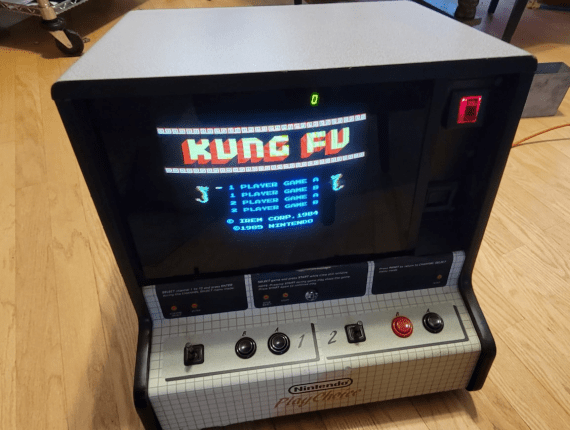
Nintendo PlayChoice Countertop

July 19, 2022 By ausretrogamer

We saw this Nintendo PlayChoice countertop machine and thought we’d share it with you!

We don’t recall coming across this countertop in any of our travels around Australia, so if you are like us, this may be the first time your eyes are feasting on such awesomeness! We have seen and played on the standup PlayChoice machines, but this one is definitely a rarity for us.

This one is for sale (at the time of writing) in Las Vegas for US$3,000. There countertop comes with 5 carts, Kung-Fu, Dr. Mario, Baseball Stars, Excitebike and Tecmo Bowl. However, it is missing a few components and the unit does have a few bumps and nicks. So if you are in the Vegas area and are keen on this expensive beauty, check out this post on Facebook to get in touch with the seller.

image source: Facebook


Filed Under: Retro Gaming Culture Tagged With: Las Vegas, NES, nintendo, Nintendo PlayChoice Countertop, oldschool, PlayChoice, PlayChoice Countertop, PlayChoice NES, Retro Gaming, Retrogamer, retrogaming

All English-Language SNES Manuals Are Now Available Online

July 8, 2022 By ausretrogamer

Retro gamers rejoice, you can finally put away your physical SNES game manuals as you can now use the SNES Manual Archive online library to check out any game manual from your smart device (or computer) anywhere in the world!

This amazing resource for nostalgic fans of videogaming history was painstakingly curated by a team of dedicated peeps lead by Peebs. To say we owe them all our gratitude would be a massive understatement!

PS: If you look closely, there are Super Famicom, N64 and Virtual Boy manuals too!

Story source: The Verge / image source: Reddit / Title image: Peebs


Filed Under: Announcements, Retro Gaming Culture Tagged With: 90s, game manuals, Geek, Japan, nintendo, oldschool, online manuals, Retro, Retro Gamers, Retro Gaming, retrogaming, SNES, SNES manuals, SNES NTSC, SNES PAL, Super Famicom, super nintendo

An Alternative 80s iPhone

June 30, 2022 By ausretrogamer

Now this alternative-history 80s iPhone by Redditor, Echonix9, is so darn clever!

But alas, it is only a prop! Don’t despair, we can still enjoy in imagining having such a device in the 80s. Echonix9 also added a light-pen peripheral, with Redditor Danamania going a step further by adding an old school green on black display (see below pic)!

Echonix9 advises that:

This took about 4 weeks to make from modelboard and laser cut acrylic. Apparently it looks like a render which I can only take as a compliment!

The display is vacuum-formed acrylic, though I essentially let the soft plastic droop into the shape of the screen. I then back-sprayed it with grey and a little silver.

I first created a CAD model in Rhino, using the rough overall dimensions of a pocket TV I have. This allowed me to print off scale plans and have the front panel cut from modelboard with a CNC machine.

With the 3D model I could also laser-cut the back and sides from acrylic, with icons and holes for sockets. There was a lot of filling and hand-sanding to get it smooth and the corners just right!

Details like the aerial, db9 socket and power switch on the opposite side were bits from my electronic stash.

I’m simplifying what is quite a unconventional method of making something like this, especially considering I have a model I could just 3D print, but I learnt a huge amount by giving it a go, making mistakes and taking advantage of the equipment I won’t always have access to, outside of education.

source: reddit | imgur | danamania


Filed Under: Retro Gaming Culture Tagged With: 1980s, 80s, 80s iPhone, alt-iPhone, db9, diy, Echonix9, homebrew, lightpen, oldschool, prop, Reddit, Retro, retro inspired, Vintage

  • « Go to Previous Page
  • Page 1
  • Page 2
  • Page 3
  • Page 4
  • Page 5
  • Interim pages omitted …
  • Page 10
  • Go to Next Page »

Primary Sidebar

Follow Us

FacebookInstagramYoutTubeTumblrFollow Us on RSSFollow Us on MastodonFollow Us on BlueskyFollow Us on Threads

Search

Shout Us A Coffee!

Recent Posts

  • The Game Expo 2026: A Sunday Well Spent
  • Happy MAR10 Day 2026!
  • Discovering the ‘HALO’ Arcade Game
  • The Holy Grail of Nintendo Collections Is For Sale
  • Virtual Boy is BACK (of all things)!

Ad

Footer

© 2012 – 2026 – ausretrogamer (The Australian Retro Gamer E-Zine). All rights reserved. Where appropriate, all trademarks and copyrighted materials remain property of their respective owners.

Terms & Conditions | Disclaimer

Advertise | About | Contact | Links

Please see our Privacy Policy for details on how we treat your personal information.

Support This Site

If you like what we do, you can shout us a coffee on Ko-fi :-)

Copyright © 2026 · News Pro on Genesis Framework · WordPress · Log in